
Luo vs Claude Cowork
Cowork completes a task on your desktop and hands back the result. Luo’s assistant does that too — in the browser, for your whole team — and the same chat can build the tools, pages, and automations your team works in.
 Watch a Luo vs Claude Cowork demo
At a glance
| Feature | Claude Cowork | Luo |
|---|---|---|
| What it is | Anthropic's AI agent for knowledge workers — takes a task and does it on its own | A workspace that builds your team's software and runs work for you — a Company OS |
| Where it runs | On your desktop, on the files and apps on your computer | In the browser, accessible to your whole team |
| How you build | Describe a task, Claude does it | Describe a task and the assistant does it; describe a tool, dashboard, or automation and it builds that too |
| One-off tasks | Yes — its core mode | Yes — the assistant runs code, reads uploaded files, reaches into your connected tools, and browses the web to return a result |
| Output | A finished deliverable (a sorted folder, a drafted doc, extracted data) | A result in the chat, or custom tools, dashboards, and automations the whole team can use |
| Team model | Personal — one human delegating a task | Team — one person builds it, the whole team uses and enrolls into it |
| Pages for the work | Chat with Claude on your desktop | Custom pages, dashboards, tables, forms — generated for your workspace |
| Knowledge base | Not part of the product | Built in: docs, notes, files linked to people and records |
| After the task | Saved files and task history remain available after a task ends | Everything stays: tools, data, pages, knowledge, automations all live on |
| Integrations | Local files, folders, desktop applications | Cloud integrations — Gmail, Slack, Linear, HubSpot, Google Workspace, and more |
| Best for | Individuals offloading personal, repetitive knowledge tasks | Teams that want custom software, an assistant, and automations in one shared workspace |
| Pricing | Included on all paid Claude plans | Free plan plus paid tiers — see luo.app/pricing |
The assistant does the task; Luo also builds the workspace around it
Both tools do the work you describe. The difference shows up after the task is done.
Cowork hands back a deliverable. You give it a task and it returns the result — point it at a folder of contracts for a summary, hand it source files for a structured draft. It works on the files and apps on your computer, completes the task, and gives you the output.
Luo’s assistant does that too — in the browser, for your whole team. Upload the contracts and it reads, extracts, and summarises them in the chat. It runs code, looks up your data, works in Gmail or Slack, and browses the web to get a task done, then hands you the result. No feature built, nothing assembled.
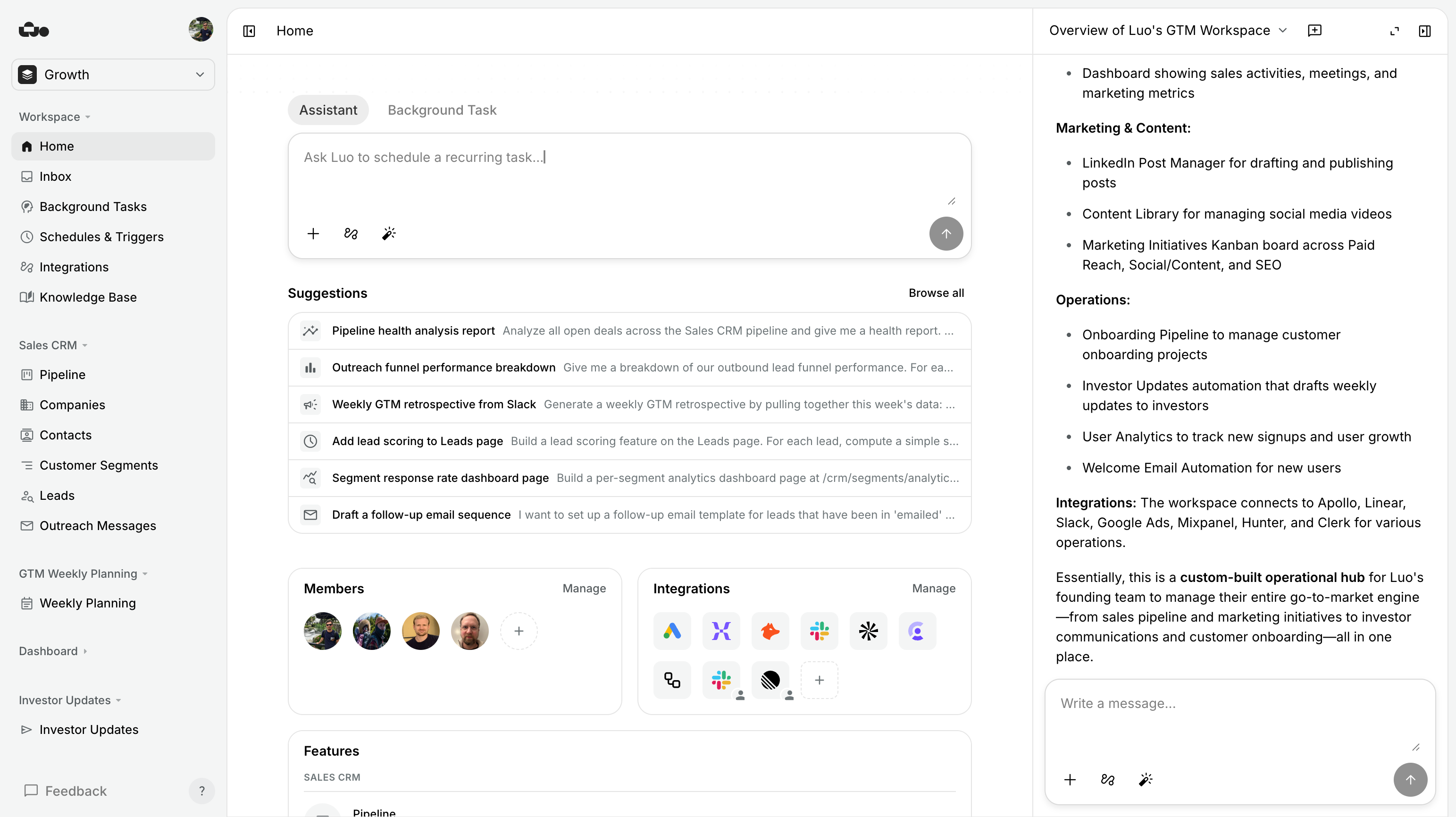
Where Luo goes further: the same conversation can build the software your team works in. When a team says “we need a way to triage incoming demo requests, send a follow-up, schedule the call, and track Q&A across the deal,” Luo builds the tool your team opens to see every request, the database and pages behind it, and the automation that does the triage and follow-up. Custom pages, data, integrations, scheduled work, knowledge base — generated from one conversation and used by everyone on the team afterwards.
Cowork hands back the result.
Luo hands back the result — and can build the software around it.
Two things matter here that other AI tools miss:
- Luo hides the technical work. You don’t design database structures, configure triggers, or map how data moves. You describe what your team needs; Luo handles the connections underneath.
- Luo builds real software, not just a one-off result. Most AI tools finish by posting a message into a chat. Luo hands you custom pages, dashboards, tables, and forms — the tools your team actually opens — and where there’s an automation, a page to start it, see its history, and analyse it over time. That’s the difference between an AI that runs a task and a workspace that’s used.
When Claude Cowork is the better choice. We’ll say this plainly because it’s true:
- The files have to stay on your machine. Cowork works on the files on your computer — folders, documents, downloads — in place, with no upload step. In Luo you’d upload the files or connect a cloud source first.
- You need to drive desktop apps. Cowork can operate the apps installed on your computer, including software nothing else can connect to. Luo works through cloud integrations, not the apps on your computer.
- It’s just you and the AI. Cowork pairs you with the AI on your own machine. If no teammate needs to run the same automation or see what it produced, that’s a fine fit. Luo handles solo work too — its payoff comes once others share the workspace.
- You’re already deep in the Claude ecosystem. It’s included on paid Claude plans through the desktop app. If you live in Claude all day, there’s no new tool to adopt.

When Luo is the better choice.
- You want software shaped to your work. A CRM with the fields you actually use, a dashboard pulling from the systems you already pay for, an internal tool that matches how your team works — Luo generates a real app for it and you refine it in chat.
- More than one person needs it. One teammate builds the workspace; everyone else uses it — shared pages, tasks, and data, not a deliverable trapped on one laptop.
- You want a knowledge base the assistant cites. Docs, links, and assets tied to people and records. The assistant draws from them instead of inventing, and new hires onboard against the same source.
- You need real data, not files in folders. Luo gives you a database built into each workspace, with the pages and tables to work it.
- The work should run on its own. Schedules and triggers — a morning brief, a Monday report, a reaction the moment a lead lands in HubSpot — keep going after you close the chat.
- You need cloud integrations. Gmail, Slack, Linear, HubSpot, Google Workspace — read and write, no migration. Cowork’s reach is your local desktop.
See it in action
Each of these is one workspace: the tools, pages, and database your team works in and the automations that keep them moving — generated from one conversation.

%20--%3e%3csvg%20version='1.1'%20id='Livello_1'%20xmlns='http://www.w3.org/2000/svg'%20xmlns:xlink='http://www.w3.org/1999/xlink'%20x='0px'%20y='0px'%20viewBox='0%200%20200%20200'%20enable-background='new%200%200%20200%20200'%20xml:space='preserve'%3e%3cg%3e%3cg%20transform='translate(3.75%203.75)'%3e%3cpath%20fill='%23FFFFFF'%20d='M148.882,43.618l-47.368-5.263l-57.895,5.263L38.355,96.25l5.263,52.632l52.632,6.579l52.632-6.579%20l5.263-53.947L148.882,43.618z'/%3e%3cpath%20fill='%231A73E8'%20d='M65.211,125.276c-3.934-2.658-6.658-6.539-8.145-11.671l9.132-3.763c0.829,3.158,2.276,5.605,4.342,7.342%20c2.053,1.737,4.553,2.592,7.474,2.592c2.987,0,5.553-0.908,7.697-2.724s3.224-4.132,3.224-6.934c0-2.868-1.132-5.211-3.395-7.026%20s-5.105-2.724-8.5-2.724h-5.276v-9.039H76.5c2.921,0,5.382-0.789,7.382-2.368c2-1.579,3-3.737,3-6.487%20c0-2.447-0.895-4.395-2.684-5.855s-4.053-2.197-6.803-2.197c-2.684,0-4.816,0.711-6.395,2.145s-2.724,3.197-3.447,5.276%20l-9.039-3.763c1.197-3.395,3.395-6.395,6.618-8.987c3.224-2.592,7.342-3.895,12.342-3.895c3.697,0,7.026,0.711,9.974,2.145%20c2.947,1.434,5.263,3.421,6.934,5.947c1.671,2.539,2.5,5.382,2.5,8.539c0,3.224-0.776,5.947-2.329,8.184%20c-1.553,2.237-3.461,3.947-5.724,5.145v0.539c2.987,1.25,5.421,3.158,7.342,5.724c1.908,2.566,2.868,5.632,2.868,9.211%20s-0.908,6.776-2.724,9.579c-1.816,2.803-4.329,5.013-7.513,6.618c-3.197,1.605-6.789,2.421-10.776,2.421%20C73.408,129.263,69.145,127.934,65.211,125.276z'/%3e%3cpath%20fill='%231A73E8'%20d='M121.25,79.961l-9.974,7.25l-5.013-7.605l17.987-12.974h6.895v61.197h-9.895L121.25,79.961z'/%3e%3cpath%20fill='%23EA4335'%20d='M148.882,196.25l47.368-47.368l-23.684-10.526l-23.684,10.526l-10.526,23.684L148.882,196.25z'/%3e%3cpath%20fill='%2334A853'%20d='M33.092,172.566l10.526,23.684h105.263v-47.368H43.618L33.092,172.566z'/%3e%3cpath%20fill='%234285F4'%20d='M12.039-3.75C3.316-3.75-3.75,3.316-3.75,12.039v136.842l23.684,10.526l23.684-10.526V43.618h105.263%20l10.526-23.684L148.882-3.75H12.039z'/%3e%3cpath%20fill='%23188038'%20d='M-3.75,148.882v31.579c0,8.724,7.066,15.789,15.789,15.789h31.579v-47.368H-3.75z'/%3e%3cpath%20fill='%23FBBC04'%20d='M148.882,43.618v105.263h47.368V43.618l-23.684-10.526L148.882,43.618z'/%3e%3cpath%20fill='%231967D2'%20d='M196.25,43.618V12.039c0-8.724-7.066-15.789-15.789-15.789h-31.579v47.368H196.25z'/%3e%3c/g%3e%3c/g%3e%3c/svg%3e)


Which tool fits the job
If you find yourself…
doing the same thing in Cowork every Monday morning — that’s a sign it should live in Luo instead, as an automation that runs on its own with a page your team opens to see what happened.
If you find yourself…
wanting to give your colleague access to the tool you built, so they can use it themselves and see its history — that’s exactly Luo’s job.
If you have…
a folder of PDFs to summarise once — upload them to Luo and ask the assistant. You get the summary back in the chat, no workspace built. Reach for Cowork when the files can’t leave your desktop.
Pricing
| Feature | Claude Cowork | Luo |
|---|---|---|
| Free tier | Not available | Yes — start free, no credit card |
| Pricing model | Bundled with a Claude subscription | Per workspace seat |
| Team / shared seats | Not the unit Cowork is priced on | Built in — workspaces are shared by design |
| Current rates | Included on paid Claude plans | See luo.app/pricing |
Cowork’s cost is your Claude subscription. Luo’s cost scales with the humans on your team using the workspace — not with how often automations run or how much data you store.
FAQ
Are Luo and Claude Cowork competitors?
Not directly. Cowork is a personal desktop agent that completes tasks on your computer. Luo's assistant completes the same kind of tasks in the browser, and the same chat can build the shared tools, pages, and automations your team works in. Many users could reasonably use both.
Does Luo run on the desktop like Cowork?
No. Luo runs in your browser, in the cloud. Your workspace and everything in it — tools, data, automations — is accessible to your whole team from anywhere.
Can Luo work with my local files?
Luo doesn't reach into the files on your computer, but you can upload files into the workspace and the assistant works on them directly — reading PDFs, extracting data, summarising. It also connects to cloud sources like Google Drive, Gmail, Slack, Linear, and HubSpot. Cowork is the better fit when the files have to stay on your machine or you need it to operate the apps installed there.
Can Claude Cowork build team software with its own interface?
No — that's not what it's built for. Cowork takes a task and produces a deliverable. It doesn't generate the custom tools, pages, shared database, or automations a team opens and uses every day. That's Luo's core.
Does Luo use Claude under the hood?
Luo isn't tied to one AI model. It picks the best available one (including Claude and other leading models) for any given task. There's nothing to set up with an AI provider; Luo handles it.
Can I use both Cowork and Luo together?
Yes. Cowork for tasks that stay on your machine and the desktop apps it drives. Luo for everything your team shares — and its assistant handles one-off tasks there too, so a lot of what you'd open Cowork for, you can just do in Luo.
Is Luo cheaper than a Claude subscription?
Luo's Free plan is $0 to start. Whether it replaces a Claude subscription depends on whether you also need Claude for chat or Cowork; many teams keep both. See luo.app/pricing for current rates.
Which is faster to set up?
Both are fast. Cowork is "open the desktop app and describe the task." Luo is "describe what your team needs and watch the workspace appear" — typically minutes from idea to a working tool your team can use.
Try Luo in 5 minutes
Think of the tool your team keeps meaning to build — or the work you keep doing by hand — and the workspace you’d want around it. Describe it to Luo.
Last updated: June 2026. Claude Cowork is a product of Anthropic; Luo is unaffiliated. If anything’s out of date, tell us.