
Luo vs n8n
Pick n8n to build automations visually as a node graph — a diagram of connected steps and triggers — configuring each connection yourself. Pick Luo to describe the system you need — workflow, user interface (UI), database, integrations, scheduled tasks — and have an AI assistant build the whole thing. Luo isn’t just an automation tool; it’s the workspace your team uses every day.
 Watch a 2-min Luo vs n8n demo
At a glance
| Feature | n8n | Luo |
|---|---|---|
| What it is | Workflow automation platform | A workspace that builds your software and runs work for you (Company OS) |
| How you build | Drag nodes onto a canvas, configure each one | Describe what you want in plain language; the assistant builds it |
| Time to first working version | Hours to days, depending on complexity | Typically minutes |
| Output | A workflow that runs in the background | A workspace: UI, database, scheduled tasks, and integrations — all live |
| Front-end for your team | None natively — you build forms / dashboards elsewhere | Generated automatically: pages, tables, charts, forms |
| Database | None natively — connect to external DBs | Built-in, tables set up from your description |
| AI assistance | AI nodes you wire into a workflow | An assistant that builds the workflow itself and edits it as you talk |
| Maintenance | You maintain the node graph | You describe what should change; the assistant updates the workspace |
| Self-hosting | Yes (open-source community edition) | Managed cloud |
| Best for | Engineers building integration pipelines | Founders, ops, sales, marketing, and product teams running their day-to-day |
The real difference: a workflow tool vs. a Company OS
n8n is excellent at one thing: connecting service A to service B with logic in between. If you need “when a Stripe payment lands, post a message in Slack and update an Airtable row,” n8n does that beautifully.
Luo solves a different problem. When a team says “we need a way to track our marketing initiatives, score them, post a weekly rollup to Slack, and let the team review and edit them in one place,” the answer in n8n is “build a workflow, then build a separate UI somewhere else, then build a database somewhere else, then keep them in sync.”
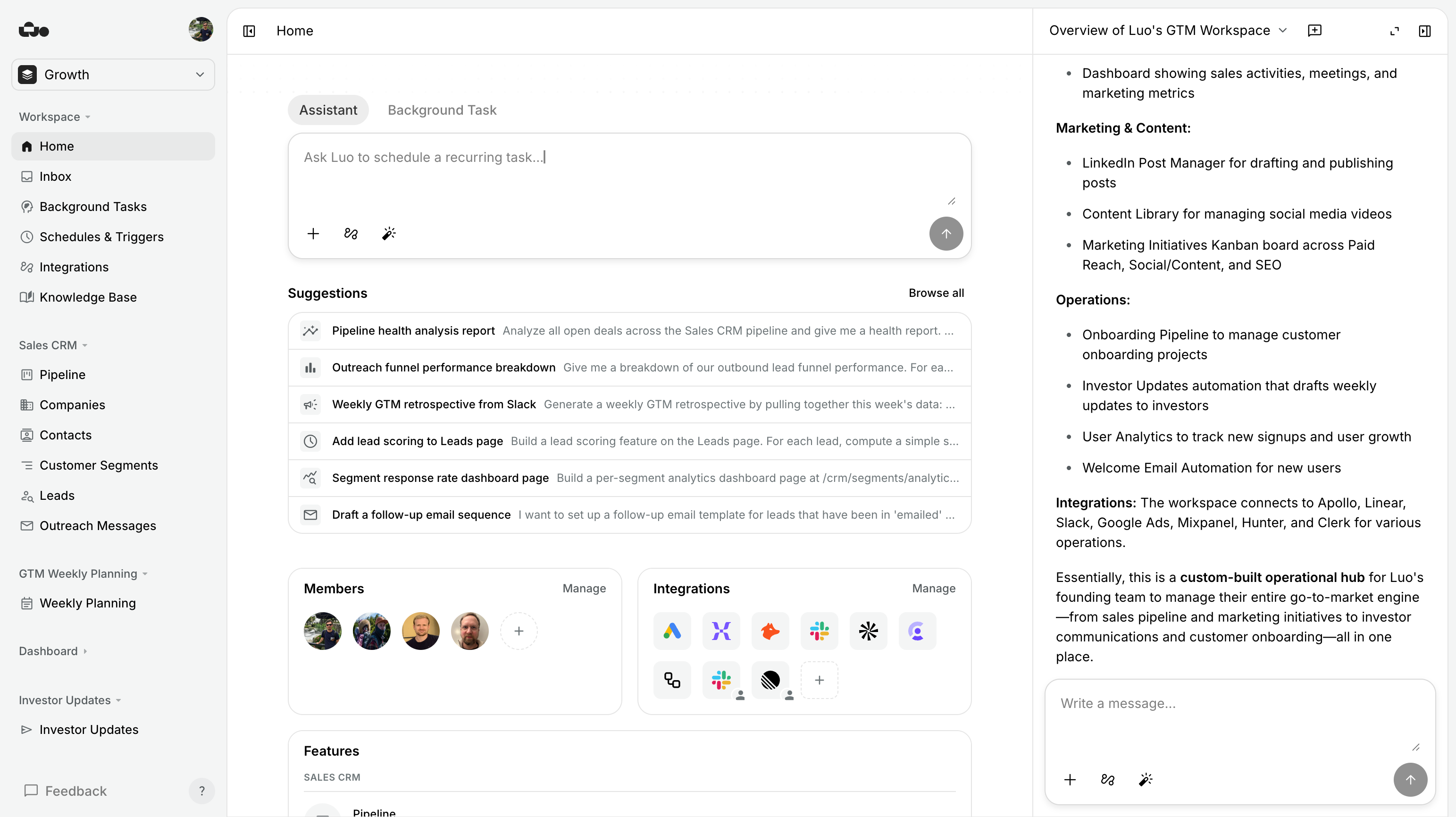
In Luo, the answer is: describe it once, and the entire workspace exists. Database, page, scheduled task, Slack integration — built, live, and editable through the same conversation.
n8n is a tool you use to build automations. Luo is the workspace your team uses to do their work.
When n8n is the better choice. We’ll say this plainly because it’s true.
- You’re an engineer building integration pipelines. The node-graph model is the right abstraction when you’re thinking in terms of data flowing between services.
- You need to self-host. n8n’s community edition is open source — run it on your own servers with full control. Luo is managed cloud only.
- You only need automation, not a workspace. No UI, no team, no recurring human interaction — just trigger → transform → push.
- You want full control over each step. n8n exposes every parameter of every node. Luo takes care of the plumbing; you describe outcomes, not connections.

When Luo is the better choice. When the output is something your team opens, not just pipes.
- You want a working internal tool, not a workflow. Pages your team opens, tables they edit, dashboards they look at — not just background pipes.
- You don’t want to maintain a node graph. Tell Luo “also include open Linear tickets in the weekly rollup” and it updates the workspace. No nodes to redraw.
- You want database + UI + automation in one place. The n8n version means stitching n8n + Airtable + Retool + a custom dashboard. Luo is all of those in one workspace.
- Your team isn’t technical. A founder, a marketing lead, or an ops person can describe what they want and Luo builds it — no node graph to learn.
What people build with Luo
The fastest way to understand the difference is to look at what people actually build. Each of these is one workspace, generated from a conversation — not a node graph plus a separate dashboard plus a separate database.


%20--%3e%3csvg%20version='1.1'%20id='Livello_1'%20xmlns='http://www.w3.org/2000/svg'%20xmlns:xlink='http://www.w3.org/1999/xlink'%20x='0px'%20y='0px'%20viewBox='0%200%20200%20200'%20enable-background='new%200%200%20200%20200'%20xml:space='preserve'%3e%3cg%3e%3cg%20transform='translate(3.75%203.75)'%3e%3cpath%20fill='%23FFFFFF'%20d='M148.882,43.618l-47.368-5.263l-57.895,5.263L38.355,96.25l5.263,52.632l52.632,6.579l52.632-6.579%20l5.263-53.947L148.882,43.618z'/%3e%3cpath%20fill='%231A73E8'%20d='M65.211,125.276c-3.934-2.658-6.658-6.539-8.145-11.671l9.132-3.763c0.829,3.158,2.276,5.605,4.342,7.342%20c2.053,1.737,4.553,2.592,7.474,2.592c2.987,0,5.553-0.908,7.697-2.724s3.224-4.132,3.224-6.934c0-2.868-1.132-5.211-3.395-7.026%20s-5.105-2.724-8.5-2.724h-5.276v-9.039H76.5c2.921,0,5.382-0.789,7.382-2.368c2-1.579,3-3.737,3-6.487%20c0-2.447-0.895-4.395-2.684-5.855s-4.053-2.197-6.803-2.197c-2.684,0-4.816,0.711-6.395,2.145s-2.724,3.197-3.447,5.276%20l-9.039-3.763c1.197-3.395,3.395-6.395,6.618-8.987c3.224-2.592,7.342-3.895,12.342-3.895c3.697,0,7.026,0.711,9.974,2.145%20c2.947,1.434,5.263,3.421,6.934,5.947c1.671,2.539,2.5,5.382,2.5,8.539c0,3.224-0.776,5.947-2.329,8.184%20c-1.553,2.237-3.461,3.947-5.724,5.145v0.539c2.987,1.25,5.421,3.158,7.342,5.724c1.908,2.566,2.868,5.632,2.868,9.211%20s-0.908,6.776-2.724,9.579c-1.816,2.803-4.329,5.013-7.513,6.618c-3.197,1.605-6.789,2.421-10.776,2.421%20C73.408,129.263,69.145,127.934,65.211,125.276z'/%3e%3cpath%20fill='%231A73E8'%20d='M121.25,79.961l-9.974,7.25l-5.013-7.605l17.987-12.974h6.895v61.197h-9.895L121.25,79.961z'/%3e%3cpath%20fill='%23EA4335'%20d='M148.882,196.25l47.368-47.368l-23.684-10.526l-23.684,10.526l-10.526,23.684L148.882,196.25z'/%3e%3cpath%20fill='%2334A853'%20d='M33.092,172.566l10.526,23.684h105.263v-47.368H43.618L33.092,172.566z'/%3e%3cpath%20fill='%234285F4'%20d='M12.039-3.75C3.316-3.75-3.75,3.316-3.75,12.039v136.842l23.684,10.526l23.684-10.526V43.618h105.263%20l10.526-23.684L148.882-3.75H12.039z'/%3e%3cpath%20fill='%23188038'%20d='M-3.75,148.882v31.579c0,8.724,7.066,15.789,15.789,15.789h31.579v-47.368H-3.75z'/%3e%3cpath%20fill='%23FBBC04'%20d='M148.882,43.618v105.263h47.368V43.618l-23.684-10.526L148.882,43.618z'/%3e%3cpath%20fill='%231967D2'%20d='M196.25,43.618V12.039c0-8.724-7.066-15.789-15.789-15.789h-31.579v47.368H196.25z'/%3e%3c/g%3e%3c/g%3e%3c/svg%3e)


Migrating from n8n to Luo
You usually don’t migrate one workflow at a time. You describe the outcome you were trying to achieve — “every Monday, summarise last week’s deals from HubSpot and post to Slack” — and Luo rebuilds it as a workspace that includes the summary, an audit history, and a page where the team can see and react to the rollup.
- Triggers. Webhooks (a tool calling Luo when something happens), scheduled tasks, and integration events all exist in Luo. You don’t connect them by hand; you describe when something should happen.
- Branching logic. Instead of If/Switch nodes, you describe the rule (“if the deal is over $50k, route to the sales lead’s channel”).
- Custom code. n8n supports JavaScript code nodes. Luo can write custom TypeScript functions with the same reach (calling outside services, integrations, AI) — you describe what the function should do, the assistant writes it.
- No node graph to maintain. This is the biggest change. There’s no canvas. The “diagram” is the conversation that built it.
Pricing
| Feature | n8n | Luo |
|---|---|---|
| Free | Community edition (self-hosted) | Free plan — get started immediately, no credit card |
| Self-hosted | Free community edition + Enterprise license | |
| Pricing model | Per workflow execution + active workflows | Per workspace seat — predictable |
| Current rates | Published per-tier on n8n.io | See luo.app/pricing |
Luo’s pricing scales with people on your team, not with how often your automations run. If a workflow runs a million times a month, you don’t pay a million times — you pay for the humans using the workspace.
Frequently asked
Is Luo a no-code tool?
It’s better described as a conversational tool. There are no nodes to drag, no formulas to write, no database tables to set up by hand. You tell the assistant what you need; the assistant builds it.
Can Luo do everything n8n can do?
For the workflow-automation use cases most teams actually have — yes, and with a UI and database included. For deeply specialised engineering pipelines with hundreds of branching paths, n8n’s node graph still gives you finer control.
Can I self-host Luo?
Not today. Luo is managed cloud only. If self-hosting is a hard requirement (data that must stay in your own country or on your own network), n8n is the right choice.
Can I import my n8n workflows?
Not directly — the two are built differently. The practical migration path is: describe the outcome the n8n workflow was producing, and Luo builds the workspace version of it.
Is Luo cheaper than n8n?
For most teams: yes, because Luo replaces n8n plus the dashboard tool, the database, and the internal-tool builder you’d otherwise stitch together. Like-for-like on automation alone, n8n’s community edition is free if you self-host.
Which is faster to set up?
Luo, by a wide margin — most workspaces in the examples gallery take 4–10 minutes from “I have an idea” to “the team is using it.”
Does Luo support webhooks and scheduled triggers?
Yes. Both are built in: Luo can start work when something happens in a connected tool (an incoming webhook) or on a schedule you set.
Is Luo open source?
No. n8n’s community edition is open source; Luo is a managed product.
Try Luo in 5 minutes
Build the same thing you’d build in n8n — and see what comes out the other side.
Last updated June 2026. Luo runs on a managed cloud; n8n offers both managed cloud and an open-source self-hosted edition. We try to keep this page honest — if anything’s out of date, tell us.